利用Windbg分析Magicodes.IE一次错误编写导致内存剧增
由于这近一年时间一直忙于写书和工作,一直没有水文,但是近期有几位朋友使用我们的Magicodes.IE反馈在导出过程中内存暴涨...好吧,不管怎样,不能苦了我们朋友,接下来我们通过windbg来看一下什么原因导致的。
接下来我们先通过address -summary来看一下当前应用内存占用量。
0:000> !address -summary

--- Usage Summary ---------------- RgnCount ----------- Total Size -------- %ofBusy %ofTotal
Free                                    581     7df8`ef0c9000 ( 125.972 TB)           98.42%
<unknown>                              1678      206`ffb9e000 (   2.027 TB)  99.99%    1.58%
Image                                   950        0`064fd000 ( 100.988 MB)   0.00%    0.00%
Heap                                     58        0`050f6000 (  80.961 MB)   0.00%    0.00%
Stack                                   156        0`04380000 (  67.500 MB)   0.00%    0.00%
Other                                    11        0`019ad000 (  25.676 MB)   0.00%    0.00%
TEB                                      52        0`00068000 ( 416.000 kB)   0.00%    0.00%
PEB                                       1        0`00001000 (   4.000 kB)   0.00%    0.00%

--- Type Summary (for busy) ------ RgnCount ----------- Total Size -------- %ofBusy %ofTotal
MEM_MAPPED                              282      200`038a6000 (   2.000 TB)  98.64%    1.56%
MEM_PRIVATE                            1674        7`07184000 (  28.111 GB)   1.35%    0.02%
MEM_IMAGE                               950        0`064fd000 ( 100.988 MB)   0.00%    0.00%

--- State Summary ---------------- RgnCount ----------- Total Size -------- %ofBusy %ofTotal
MEM_FREE                                581     7df8`ef0c9000 ( 125.972 TB)           98.42%
MEM_RESERVE                             295      205`f8659000 (   2.023 TB)  99.79%    1.58%
MEM_COMMIT                             2611        1`188ce000 (   4.384 GB)   0.21%    0.00%

--- Protect Summary (for commit) - RgnCount ----------- Total Size -------- %ofBusy %ofTotal
PAGE_READWRITE                         1595        1`0dc6c000 (   4.215 GB)   0.20%    0.00%
PAGE_EXECUTE_READ                       156        0`04d66000 (  77.398 MB)   0.00%    0.00%
PAGE_READONLY                           600        0`03851000 (  56.316 MB)   0.00%    0.00%
PAGE_NOACCESS                            99        0`021f2000 (  33.945 MB)   0.00%    0.00%
PAGE_EXECUTE_READWRITE                   19        0`0027b000 (   2.480 MB)   0.00%    0.00%
PAGE_WRITECOPY                           90        0`001a0000 (   1.625 MB)   0.00%    0.00%
PAGE_READWRITE | PAGE_GUARD              52        0`0009e000 ( 632.000 kB)   0.00%    0.00%

--- Largest Region by Usage ----------- Base Address -------- Region Size ----------
Free                                    189`0413c000     7c6b`01ed4000 ( 124.418 TB)
<unknown>                              7dfb`2a153000      1f9`bd2ef000 (   1.976 TB)
Image                                  7ffc`883c1000        0`009ba000 (   9.727 MB)
Heap                                    183`0e9a1000        0`00f01000 (  15.004 MB)
Stack                                    37`62980000        0`0017b000 (   1.480 MB)
Other                                   183`77707000        0`01775000 (  23.457 MB)
TEB                                      37`62600000        0`00002000 (   8.000 kB)
PEB                                      37`627dd000        0`00001000 (   4.000 kB)
MEM_COMMIT占用了4.384G,接下来我们利用eeheap -gc来检查托管堆。
0:000> !eeheap -gc
GC Allocated Heap Size:    Size: 0x11ac2568 (296494440) bytes.
GC Committed Heap Size:    Size: 0x120e7000 (302936064) bytes.
根据这些内存来看,似乎问题不是这里,大量的内存还是出现在非托管。我们利用Windows NT堆来看一下,其实在Windows中大多数的用户堆分配器都在ntdll.dll中的NT堆管理器API(RtlAllocateHeap/RtlFreeHeap)上建立,比如说C中的malloc/free和new/delete,另外还有COM框架中的SysAllocString以及在Win32中的LocalAlloc、GlobalAlloc和HeapAlloc,虽然说这些分配器都会创建不同的堆来存储它们的内存,但是他们最终都要调用ntdll.dll中的NT堆来实现。
0:000> !heap -s


************************************************************************************************************************
                                              NT HEAP STATS BELOW
************************************************************************************************************************
NtGlobalFlag enables following debugging aids for new heaps:
    stack back traces
LFH Key                   : 0x7cfd4cc2db4ddb4d
Termination on corruption : ENABLED
          Heap     Flags   Reserv  Commit  Virt   Free  List   UCR  Virt  Lock  Fast
                            (k)     (k)    (k)     (k) length      blocks cont. heap
-------------------------------------------------------------------------------------
0000018378fd0000 08000002   65128  15296  64928   1720   177    17    2      c   LFH
    External fragmentation  11 % (177 free blocks)
00000183775c0000 08008000      64      4     64      2     1     1    0      0
000001837aa90000 08001002    1280    108   1080     26     3     2    0      0   LFH
000001837ad20000 08001002      60      8     60      2     1     1    0      0
000001837aca0000 08041002      60      8     60      5     1     1    0      0
000001887bfd0000 08001002      60     20     60      1     2     1    0      0
000001830cf30000 08001002    3324   1364   3124     19    10     3    0      0   LFH
000001830ce30000 08001002      60      8     60      5     1     1    0      0
-------------------------------------------------------------------------------------
输出结果如上所示,NT堆内容好少....什么原因....好吧根据 maoni所说,似乎是验证出了问题。
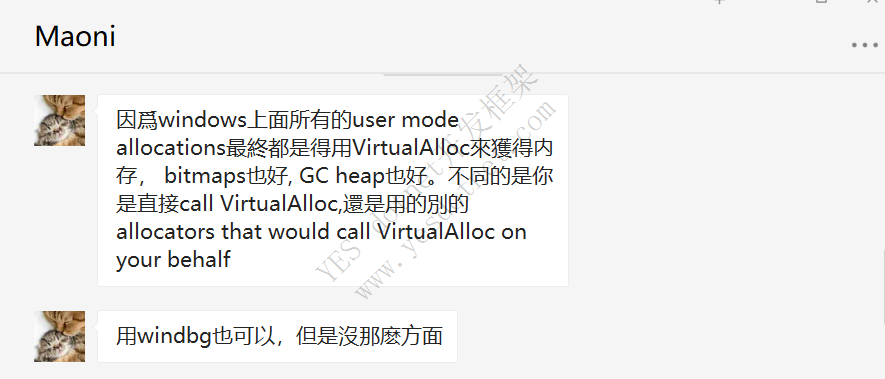

GC没有管辖这些内存,所以说还是我们编写的代码有问题,我们返过来再考虑一个事情,“导出进行时,内存会大量增加,导出完成后内存会降低下去”。我们来看一下代码,如下所示,其实我们现在明白的是,在我们执行期间肯定是这些内存一直“持有”,并没有被释放掉。
app.MapGet("/excel", async content =>
{
    string path = Path.Combine(Directory.GetCurrentDirectory(), "test.xlsx");
    List<TestDto> list = new();
    for (int i = 0; i < 400; i++)
    {
        list.Add(new TestDto
        {
            ImageUrl = "https://gimg2.baidu.com/image_search/src=http%3A%2F%2Fup.enterdesk.com%2Fedpic_source%2F53%2F0a%2Fda%2F530adad966630fce548cd408237ff200.jpg&refer=http%3A%2F%2Fup.enterdesk.com&app=2002&size=f9999,10000&q=a80&n=0&g=0n&fmt=jpeg?sec=1641193100&t=417a589da8c9ba3103ed74c33fbd6c70"
        });
    }
    Stopwatch stopwatch = Stopwatch.StartNew();
    ExcelExporter exporter = new ExcelExporter();
    await exporter.Export(path, list);
    stopwatch.Stop();
    await content.Response.WriteAsync(stopwatch.Elapsed.TotalSeconds.ToString());
});
根据内存的表现和我们的理论,我们继续利用windbg来排查一下,现在其实我们可以发现,这些对象最终还是被GC收回了,带着理论我们继续构思,GC是知道哪些对象可以终结的对吧?并且它们在变成不可到达时调用它们的终结器,在GC中会利用finalization queue来记录这些终结对象。所以说我们是不是可以查一下?如下所示,我们来看一下。
0:000> !finalizequeue
----------------------------------
Statistics for all finalizable objects (including all objects ready for finalization):
              MT    Count    TotalSize Class Name
00007ffc2dc23818        1           24 System.Net.Security.SafeCredentialReference
00007ffc2dac4238        1           24 System.WeakReference
00007ffc2d6eb908        1           24 System.WeakReference`1[[Microsoft.AspNetCore.Server.Kestrel.Core.KestrelServerOptions, Microsoft.AspNetCore.Server.Kestrel.Core]]
00007ffc2d6e4120        1           24 System.WeakReference`1[[System.Runtime.Loader.AssemblyLoadContext, System.Private.CoreLib]]
00007ffc2d572b68        1           24 System.WeakReference`1[[Microsoft.Extensions.DependencyInjection.ServiceProvider, Microsoft.Extensions.DependencyInjection]]
00007ffc2d429258        1           24 System.WeakReference`1[[System.IO.FileSystemWatcher, System.IO.FileSystem.Watcher]]
00007ffc2dd15c20        1           32 Microsoft.Win32.SafeHandles.SafeBCryptAlgorithmHandle
00007ffc2d6de4d8        1           32 Internal.Cryptography.Pal.Native.SafeLocalAllocHandle
00007ffc2d68fa00        1           32 Internal.Cryptography.Pal.Native.SafeCertStoreHandle
00007ffc2d3a5cc0        1           32 System.Net.Quic.Implementations.MsQuic.Internal.SafeMsQuicRegistrationHandle
00007ffc2db390c8        1           40 Interop+WinHttp+SafeWinHttpHandle
00007ffc2d69a420        1           40 Internal.Cryptography.Pal.Native.SafeCertContextHandle
00007ffc2d5bea18        1           40 System.Diagnostics.EventLog
00007ffc2dc29a38        1           48 System.Net.Security.SafeFreeCredential_SECURITY
00007ffc2d963f80        2           48 System.WeakReference`1[[System.Text.RegularExpressions.RegexReplacement, System.Text.RegularExpressions]]
00007ffc2d7a3750        2           48 System.WeakReference`1[[Microsoft.AspNetCore.Server.Kestrel.Core.Internal.Infrastructure.KestrelConnection, Microsoft.AspNetCore.Server.Kestrel.Core]]
00007ffc2d685e10        1           56 System.Runtime.CompilerServices.ConditionalWeakTable`2+Container[[System.Buffers.TlsOverPerCoreLockedStacksArrayPool`1+ThreadLocalArray[[System.Char, System.Private.CoreLib]][], System.Private.CoreLib],[System.Object, System.Private.CoreLib]]
00007ffc2d44c4d0        1           56 System.Runtime.CompilerServices.ConditionalWeakTable`2+Container[[System.Buffers.TlsOverPerCoreLockedStacksArrayPool`1+ThreadLocalArray[[System.Byte, System.Private.CoreLib]][], System.Private.CoreLib],[System.Object, System.Private.CoreLib]]
00007ffc2d96be68        1           64 CellStore`1[[System.Uri, System.Private.Uri]]
00007ffc2d96b780        1           64 FlagCellStore
00007ffc2d96af48        1           64 CellStore`1[[System.Object, System.Private.CoreLib]]
00007ffc2d96a5b8        1           64 CellStore`1[[OfficeOpenXml.ExcelCoreValue, Magicodes.IE.EPPlus]]
00007ffc2d6ddab8        2           64 Internal.Cryptography.Pal.Native.SafeChainEngineHandle
00007ffc2d69d528        2           64 Internal.Win32.SafeHandles.SafeRegistryHandle
00007ffc2d685bc8        2           64 Microsoft.Win32.SafeHandles.SafeWaitHandle
00007ffc2d685280        3           72 System.Threading.ThreadInt64PersistentCounter+ThreadLocalNodeFinalizationHelper
00007ffc2d5f5f50        3           72 System.Runtime.InteropServices.PosixSignalRegistration
00007ffc2d4299d0        1           72 Microsoft.Win32.SafeHandles.SafeFileHandle
00007ffc2d6e40b8        1           80 System.Runtime.Loader.DefaultAssemblyLoadContext
00007ffc2dac9ed0        2           96 PageIndex
00007ffc2d96d0c8        2           96 ColumnIndex
00007ffc2d464470        3          120 System.Gen2GcCallback
00007ffc2d40a620        1          120 System.IO.FileSystemWatcher
00007ffc2d96bc18        2          128 CellStore`1[[System.Int32, System.Private.CoreLib]]
00007ffc2dac20c8        2          144 System.Reflection.Emit.DynamicResolver
00007ffc2d680f10        3          144 System.Threading.LowLevelLock
00007ffc2d683c48        3          168 System.Threading.ThreadPoolWorkQueueThreadLocals
00007ffc2d681e80        1          176 System.Threading.LowLevelLifoSemaphore
00007ffc2dc25ef0        1          184 System.Collections.Concurrent.CDSCollectionETWBCLProvider
00007ffc2db8e658        1          184 System.Net.NetEventSource
00007ffc2db8c378        1          184 System.Net.NetEventSource
00007ffc2db38f90        1          184 System.Net.NetEventSource
00007ffc2d90c658        1          184 Microsoft.IO.RecyclableMemoryStreamManager+Events
00007ffc2d689b48        1          184 Microsoft.AspNetCore.Certificates.Generation.CertificateManager+CertificateManagerEventSource
00007ffc2d66f9f8        1          184 System.Diagnostics.Tracing.FrameworkEventSource
00007ffc2d66b720        1          184 System.Net.NetEventSource
00007ffc2d44d128        1          184 System.Buffers.ArrayPoolEventSource
00007ffc2d2e2ec8        1          184 System.Diagnostics.Tracing.NativeRuntimeEventSource
00007ffc2d694e10        1          192 System.Threading.Tasks.TplEventSource
00007ffc2d572ab0        1          192 Microsoft.Extensions.DependencyInjection.DependencyInjectionEventSource
00007ffc2d505f00        1          200 Microsoft.Extensions.Logging.EventSource.LoggingEventSource
00007ffc2db8ade8        1          224 System.Net.NameResolutionTelemetry
00007ffc2d428b08        7          224 System.Threading.PreAllocatedOverlapped
00007ffc2d563c78        1          232 System.Diagnostics.DiagnosticSourceEventSource
00007ffc2d61fe88        1          240 Microsoft.AspNetCore.Hosting.HostingEventSource
00007ffc2db6b788        8          256 System.Threading.TimerQueue+AppDomainTimerSafeHandle
00007ffc2d690270        1          280 System.Net.Sockets.SocketsTelemetry
00007ffc2db6bc80        1          296 System.Net.Http.HttpTelemetry
00007ffc2d68b998        1          336 Microsoft.AspNetCore.Server.Kestrel.Core.Internal.Infrastructure.KestrelEventSource
00007ffc2dc21998        1          360 System.Net.Security.NetSecurityTelemetry
00007ffc2d2dae28        1          384 System.Diagnostics.Tracing.RuntimeEventSource
00007ffc2d66ad60       10          480 System.Net.Sockets.SafeSocketHandle
00007ffc2d2e0240       21          504 System.WeakReference`1[[System.Diagnostics.Tracing.EventSource, System.Private.CoreLib]]
00007ffc2d2b0538        9          648 System.Threading.Thread
00007ffc2d77a188        2          704 Microsoft.AspNetCore.Server.Kestrel.Transport.Sockets.Internal.SocketReceiver
00007ffc2d90cec0        6          960 Microsoft.IO.RecyclableMemoryStream
00007ffc2d5fc658       10         1280 System.Net.Sockets.Socket
00007ffc2d68d898        4         1536 System.Net.Sockets.Socket+AwaitableSocketAsyncEventArgs
00007ffc2d2dc778       42         4704 System.Diagnostics.Tracing.EventSource+OverrideEventProvider
00007ffc2daec058      356        14240 System.Drawing.Bitmap
Total 553 objects
WOW!!!,看上面356个System.Drawing.Bitmap在等待回收,看起来这是我们的影响因素,我们来查一下代码。
 try
{
    cell.Value = string.Empty;
    Bitmap bitmap;
    if (url.IsBase64StringValid())
    {
        bitmap = url.Base64StringToBitmap();
    }
    else
    {
        bitmap = Extension.GetBitmapByUrl(url);
    }

    if (bitmap == null)
    {
        cell.Value = ExporterHeaderList[colIndex].ExportImageFieldAttribute.Alt;
    }
    else
    {
        ExcelPicture pic = CurrentExcelWorksheet.Drawings.AddPicture(Guid.NewGuid().ToString(), bitmap);
        AddImage((rowIndex + (ExcelExporterSettings.HeaderRowIndex > 1 ? ExcelExporterSettings.HeaderRowIndex : 0)),
            colIndex - ignoreCount, pic, ExporterHeaderList[colIndex].ExportImageFieldAttribute.YOffset, ExporterHeaderList[colIndex].ExportImageFieldAttribute.XOffset);
        CurrentExcelWorksheet.Row(rowIndex + 1).Height = ExporterHeaderList[colIndex].ExportImageFieldAttribute.Height;
        pic.SetSize(ExporterHeaderList[colIndex].ExportImageFieldAttribute.Width * 7, ExporterHeaderList[colIndex].ExportImageFieldAttribute.Height);
    }

}
catch (Exception)
{
    cell.Value = ExporterHeaderList[colIndex].ExportImageFieldAttribute.Alt;
}
在ExcelPicture对象中去使用Bitmap对象,对于在线图片源来说,我们会读取并存储到Bitmap中,但是我们发现并没有对该对象进行释放操作,所以导致大量的Bitmap一直没有释放,我们通过using来处理一下。
using (ExcelPicture pic = CurrentExcelWorksheet.Drawings.AddPicture(Guid.NewGuid().ToString(), bitmap))
{
    AddImage((rowIndex + (ExcelExporterSettings.HeaderRowIndex > 1 ? ExcelExporterSettings.HeaderRowIndex : 0)),
        colIndex - ignoreCount, pic, ExporterHeaderList[colIndex].ExportImageFieldAttribute.YOffset, ExporterHeaderList[colIndex].ExportImageFieldAttribute.XOffset);
    CurrentExcelWorksheet.Row(rowIndex + 1).Height = ExporterHeaderList[colIndex].ExportImageFieldAttribute.Height;
    pic.SetSize(ExporterHeaderList[colIndex].ExportImageFieldAttribute.Width * 7, ExporterHeaderList[colIndex].ExportImageFieldAttribute.Height);
}
一个带有终结器的新对象是必须要被添加进finalization queue中的,这个行为也被称为“终结注册(registering for finalization)”。
当然我也建议你选择使用SOSEX扩展插件,它提供了finalization类似的内容,似乎看起来更直观一些,如下所示。
下载地址:http://www.stevestechspot.com/default.aspx
:000> .load D:\sosex_64\sosex.dll
This dump has no SOSEX heap index.
The heap index makes searching for references and roots much faster.
To create a heap index, run !bhi
0:000> !finq -stat
Generation 0:
       Count      Total Size   Type
---------------------------------------------------------
          54            2160   System.Drawing.Bitmap

54 objects, 2,160 bytes

Generation 1:
       Count      Total Size   Type
---------------------------------------------------------
           1             184   Microsoft.AspNetCore.Certificates.Generation.CertificateManager+CertificateManagerEventSource
           1             336   Microsoft.AspNetCore.Server.Kestrel.Core.Internal.Infrastructure.KestrelEventSource
           4            1536   System.Net.Sockets.Socket+AwaitableSocketAsyncEventArgs
           1              32   Internal.Cryptography.Pal.Native.SafeCertStoreHandle
           1             280   System.Net.Sockets.SocketsTelemetry
           1             192   System.Threading.Tasks.TplEventSource
           1              40   Internal.Cryptography.Pal.Native.SafeCertContextHandle
           2              64   Internal.Win32.SafeHandles.SafeRegistryHandle
           2              64   Internal.Cryptography.Pal.Native.SafeChainEngineHandle
           1              32   Internal.Cryptography.Pal.Native.SafeLocalAllocHandle
           1              80   System.Runtime.Loader.DefaultAssemblyLoadContext
           1              24   System.WeakReference`1[[System.Runtime.Loader.AssemblyLoadContext, System.Private.CoreLib]]
           1              24   System.WeakReference`1[[Microsoft.AspNetCore.Server.Kestrel.Core.KestrelServerOptions, Microsoft.AspNetCore.Server.Kestrel.Core]]
           2             704   Microsoft.AspNetCore.Server.Kestrel.Transport.Sockets.Internal.SocketReceiver
           2              48   System.WeakReference`1[[Microsoft.AspNetCore.Server.Kestrel.Core.Internal.Infrastructure.KestrelConnection, Microsoft.AspNetCore.Server.Kestrel.Core]]
           1             184   Microsoft.IO.RecyclableMemoryStreamManager+Events
           6             960   Microsoft.IO.RecyclableMemoryStream
           2              48   System.WeakReference`1[[System.Text.RegularExpressions.RegexReplacement, System.Text.RegularExpressions]]
           1              64   CellStore`1[[OfficeOpenXml.ExcelCoreValue, Magicodes.IE.EPPlus]]
           1              64   CellStore`1[[System.Object, System.Private.CoreLib]]
           1              64   FlagCellStore
           2             128   CellStore`1[[System.Int32, System.Private.CoreLib]]
           1              64   CellStore`1[[System.Uri, System.Private.Uri]]
           2              96   ColumnIndex
           2             144   System.Reflection.Emit.DynamicResolver
           1              24   System.WeakReference
           2              96   PageIndex
         302           12080   System.Drawing.Bitmap
           1             184   System.Net.NetEventSource
           1              40   Interop+WinHttp+SafeWinHttpHandle
           8             256   System.Threading.TimerQueue+AppDomainTimerSafeHandle
           1             296   System.Net.Http.HttpTelemetry
           1             224   System.Net.NameResolutionTelemetry
           1             184   System.Net.NetEventSource
           1             184   System.Net.NetEventSource
           1             360   System.Net.Security.NetSecurityTelemetry
           1              24   System.Net.Security.SafeCredentialReference
           1             184   System.Collections.Concurrent.CDSCollectionETWBCLProvider
           1              48   System.Net.Security.SafeFreeCredential_SECURITY
           1              32   Microsoft.Win32.SafeHandles.SafeBCryptAlgorithmHandle

499 objects, 30,736 bytes

Generation 2:
0 objects, 0 bytes

TOTAL: 553 objects, 32,896 bytes
可能大家都会像我一开始有个疑问,你这个图片我看了...没有那么大,并且在windbg中也没有表现大小呀。首先我们先来看一下这个图片的质量。
图片的像素为2560x1440,位深为24目前已知这些信息,我们计算一下未压缩的图片大小。
2560x1440x24/8
10M左右一张图,已知图片数x10M=3G,其实对于这个问题来说,这并不属于内存泄漏。