C# WPF MVVM模式Prism框架从零搭建(经典)
01
—
前言
目前最新的PRISM的版本是8.1.97,本节以6.3.0.0 讲解,可以在Github上获取PRISM的源码。
Prism Github地址:https://github.com/PrismLibrary/Prism
Prism官方文档:https://prismlibrary.com/docs/
Prism要用到IOC容器,提供选择的有Unity和MEF,这里我分别采用MEF和unity去做,不懂MEF的建议看看这位大牛的系列博文http://www.cnblogs.com/yunfeifei/p/3922668.html
02
—
安装库
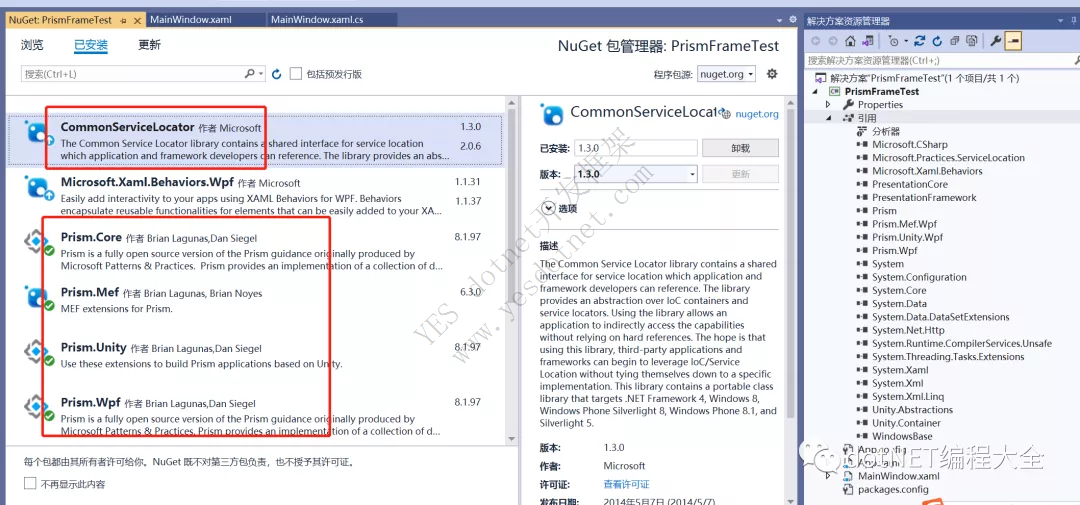
在nuget上安装Prism相关常用的库
03
—
项目搭建
step1:新建解决方案:我这里命名为PrismFrameTest;
step2:删除MainWindow.xaml,删除App.xaml中启动引导
StartupUri="MainWindow.xaml"
然后在App.xaml.cs新建程序入口
 protected override void OnStartup(StartupEventArgs e)
        {
            base.OnStartup(e);
            MyBootstrapper bootStrapper = new MyBootstrapper();
            bootStrapper.Run(true);
        }
新建引导类MyBootstrapper.cs,需要继承基类Prism.Mef库下的基类MefBootstrapper
方式1 采用mef
public class MyBootstrapper : MefBootstrapper
    {
        protected override DependencyObject CreateShell()
        {
            return this.Container.GetExportedValue<MyShellView>();
        }
        protected override void InitializeShell()
        {
            base.InitializeShell();
            Application.Current.MainWindow = (MyShellView)this.Shell;
            Application.Current.MainWindow.Show();//Show主窗口,但content内没有内容,只有当调用Module中的Initialize()方法后才将HelloWorldView显示出来。
        }
        protected override void ConfigureAggregateCatalog()
        {
            base.ConfigureAggregateCatalog();
            this.AggregateCatalog.Catalogs.Add(new AssemblyCatalog(typeof(MyBootstrapper).Assembly));
            this.AggregateCatalog.Catalogs.Add(new AssemblyCatalog(typeof(PrismModuleLeft.ModuleLeftViewModel).Assembly));//注册模块
            //this.AggregateCatalog.Catalogs.Add(new AssemblyCatalog(typeof(ModuleB.ModuleBViewModel).Assembly));
        }
        protected override IModuleCatalog CreateModuleCatalog()
        {
            // When using MEF, the existing Prism ModuleCatalog is still the place to configure modules via configuration files.
            return new ConfigurationModuleCatalog();
        }

    }
方式2 采用unity
public class MyBootstrapper : UnityBootstrapper
    {
        protected override DependencyObject CreateShell()
        {
            return Container.Resolve<MyShellView>();
        }

        protected override void InitializeShell()
        {
            base.InitializeShell();

            Application.Current.MainWindow = (MyShellView)this.Shell;
            Application.Current.MainWindow.Show();//Show主窗口,但content内没有内容,只有当调用Module中的Initialize()方法后才将HelloWorldView显示出来。
        }

        protected override void ConfigureModuleCatalog()
        {
            base.ConfigureModuleCatalog();

            ModuleCatalog moduleCatalog = (ModuleCatalog)this.ModuleCatalog;
            moduleCatalog.AddModule(typeof(PrismModuleLeft.ModuleLeftViewModel));//注册模块
        }

    }
step3:
然后新建一个xaml窗体MyShellView.xaml,将窗体分为左右两部分
这里cal:RegionManager.RegionName是一个依赖属性,我们将它与ItemsControl控件相关联,MainRegion就是一个占位符。
 <ItemsControl cal:RegionManager.RegionName="RegionLeft" HorizontalAlignment="Center" VerticalAlignment="Center"/>
 <ItemsControl cal:RegionManager.RegionName="RegionRight" HorizontalAlignment="Center" VerticalAlignment="Center" Grid.Column="1"/>
对应的cs中将类标注为 [Export]
step4:新建类库PrismModuleLeft
类库中新建ModuleLeftView.xaml
关于事件绑定:(在下面代码中两种方式都列出来了)
①控件继承自ButtonBase、MenuItem类,比如:Button、RadioButton、Hyperlink、MenuItem……这种情况下,由于Prism已经帮我们实现了这些控件的Command属性,可以直接绑定Command属性来完成Click事件到ViewModel的绑定:
②ListView、ListBox、DropDownList等等大部分没有Click事件的控件。这时候,当我们要实现SelectedItemChanged、SelectionChanged等常用事件的时候,使用Expression Blend附带的System.Windows.Interactivity.dll文件,它使用interaction trigger和InvokeCommandAction behavior来帮助我们直接绑定控件的事件。
需要引用
xmlns:i="http://schemas.microsoft.com/expression/2010/interactivity"
 <Grid>
        <Grid.RowDefinitions>
            <RowDefinition/>
            <RowDefinition/>
        </Grid.RowDefinitions>
        <TextBlock  Foreground="Red" FontSize="20" Text="{Binding TxtLabel}" Background="Gray" Grid.Row="0"/>
        <Button Background="LightCyan" Name="CreateRecipe" Command="{Binding CreateRecipeCommand}" Content="BtnCtr" FontSize="20" Grid.Row="1">
            <i:Interaction.Triggers >
                <i:EventTrigger EventName="PreviewKeyDown">
                    <i:InvokeCommandAction Command="{Binding KeyUpEventCommand}" />
                </i:EventTrigger>
            </i:Interaction.Triggers>
        </Button>
        </Grid>
对应的cs中:
 [Export]
    public partial class ModuleLeftView : UserControl
    {
        private readonly IRegionViewRegistry regionViewRegistry;
        public ModuleLeftView()
        {
            InitializeComponent();
            this.DataContext = new ModuleLeftViewModel(regionViewRegistry);
        }
    }
step4:ModuleLeftViewModel中:
using Prism.Commands;
using Prism.Mef.Modularity;
using Prism.Modularity;
using Prism.Mvvm;
using Prism.Regions;
using PropertyChanged;
using System.ComponentModel.Composition;
using System.Windows;
using System.Windows.Input;

namespace PrismModuleLeft
{
    [AddINotifyPropertyChangedInterface]
    [ModuleExport("ModuleLeftViewModel", typeof(ModuleLeftViewModel), InitializationMode = InitializationMode.WhenAvailable)]
    public class ModuleLeftViewModel : BindableBase,IModule
    {
        private readonly IRegionViewRegistry regionViewRegistry;
        public ICommand CreateRecipeCommand { get; set; }
        public DelegateCommand<KeyEventArgs> KeyUpEventCommand { get; private set; }
        public string TxtLabel { get; set; } = "Hello! I am ModuleA";
        public void KeyUpEventHandler(KeyEventArgs args)
        {
            MessageBox.Show("PrismCTR");
        }
        public void Initialize()
        {
            regionViewRegistry.RegisterViewWithRegion("RegionLeft", typeof(ModuleLeftView));

        }
        [ImportingConstructor]
        public ModuleLeftViewModel(IRegionViewRegistry registry)
        {
            this.regionViewRegistry = registry;
            CreateRecipeCommand = new DelegateCommand(() => CreateRecipe());
        }
        public void CreateRecipe()
        {
            TxtLabel = "this is my first prism test example";
            MessageBox.Show(TxtLabel);
        }
    }
}
04
—
总结
这个时候我们来对PRISM的基础架构做一个简单的总结:
Shell: 主窗口,他的功能都是通过Module来实现的;
Bootstrapper: 应用程序的入口点;
Region: 内容区域,类似于一个占位符
Module: 真正实现业务功能的东西,是View,数据,模型组成的集合;
Prism是个非常强大的wpf mvvm模式框架,它使用依赖注入,控制反转容器来帮助我们解决团队合作的松耦合问题。
05
—
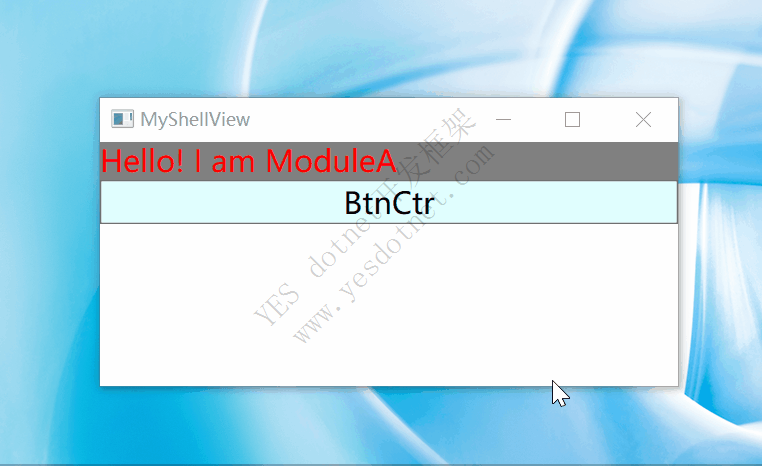
结果演示
05
—
源码
链接:https://pan.baidu.com/s/1utVT-087R1WonjoHZrv_Iw
提取码:添加小编微信zls20210502获取
技术群: 需要进技术群的添加小编微信zls20210502 ,备注:加群;