【.NET 与树莓派】MPD 的 Mini-API 封装
在前面的水文中,一方面,老周向各位同学介绍了通过 TCP 连接来访问 MPD 服务;另一方面,也简单演示了 ASP.NET Core 的“极简 API”(Mini API)。本篇老周就简单说一下如何用 Mini API 来封装对 MPD 服务器的访问。内容仅供参考,也许你会想到更好的方案。
你可能会问:老周,你这个懒B,上次写完之后,咋等了这么久才写这一篇?实不相瞒,因为遇到问题了……这问题主要出在了“add”命令上。
这个命令的功能是把某一曲目添加到当前播放列表中(不管你是否加载以前保存的列表,总之就是当前正在用的播放列表),其格式为:
add <音频文件URL>
还记得前面的内容乎?咱们在配置 MPD 时,会指定一个专门放置音乐文件的目录,因此,这个音频URL一般使用相对路径,即相对音乐目录的相对路径。
比如,你配置的音乐目录是 /home/pi/mpd/music,然后,你在 music 目录下放了一个子目录叫“装逼2021全新专辑”,里面有三个文件,结构大致如下:
装逼2021全新专辑
        |-- 千年装逼魂.wav
        |-- 每天装一逼.wav
        |-- 装逼的人儿真无奈.wav
即,“千年装逼魂.wav”的全路径是 /home/pi/mpd/music/装逼2021全新专辑/千年装逼魂.wav,但是,使用 add 命令时,只使用相对路径即可,相对于音乐目录。
add "装逼2021全新专辑/千年装逼魂.wav"
URL最好加上双引号,因为路径中带有空格的概率很高。
那么,老周遇到的问题是啥?因为这个 add 命令会引用音频文件路径,这文本中避免不了会出现汉字字符。说到这里你估计明白了,对的,让人头痛的老问题——文本编码问题。有汉字字符就不能使用 ASCII 编码了,但显式使用 UTF-8 编码也不行,经多次尝试,还是报错。
终于,被老周测出一个完美解决方法——直接使用 Encoding.Default,让运行时自动使用与系统一致的编码。真 TM 没想到,这一招居然把所有问题全解决了,不再报错了。果然,默认的是最使的。
----------------------------------------------------------------------------------------------------
既然问题解决了,那么这篇水文就能写了。
为了方便操作,咱们不妨先单独封装一个类,这个类专用来与 MPD 服务进程通信。现在我把整个类的代码先放出来,然后老周再说一下核心部分。
namespace MpcApi
{
    using System;
    using System.IO;
    using System.Net;
    using System.Collections.ObjectModel;
    using System.Net.Sockets;
    using static System.Text.Encoding;
    using System.Text;

    internal class MPDTCPClient : IDisposable
    {
        const string LOCAL_HOST = "localhost";  // 本机地址
        const int LOCAL_PORT = 6600;            // 默认端口

        TcpClient _client;

        /// <summary>
        /// 构造函数
        /// </summary>
        public MPDTCPClient()
        {
            _client = new TcpClient(LOCAL_HOST, LOCAL_PORT);
            // 判断MPD服务器是否有应答
            using StreamReader sr = new StreamReader(
                    stream: _client.GetStream(),
                    encoding: UTF8,
                    leaveOpen: true
                );

            string resp = sr.ReadLine();
            if (resp == null || !resp.StartsWith("OK MPD"))
            {
                throw new Exception("服务器未正确响应");
            }
        }

        public void Dispose()
        {
            _client?.Close();
        }

        private TextReader SendCommand(string cmd)
        {
            StreamWriter wr = new(
                stream: _client.GetStream(),
                encoding: Default,
                leaveOpen: true);
            wr.NewLine = "\n";  //换行符避免出现“\r\n”
            // 写命令
            wr.WriteLine(cmd);
            wr.Flush();
            wr.Dispose();
            // 读响应
            StreamReader sr = new StreamReader(
                        stream: _client.GetStream(),
                        encoding: Default,
                        leaveOpen: true);
            return sr;  //留给其他方法进一步处理
        }

        #region 以下方法为公共成员
        /*
         * 为了用起来方便,封装一下
         */

        /// <summary>
        /// 获取可用命令
        /// </summary>
        public async Task<IReadOnlyList<string>> GetAvalidCommands()
        {
            List<string> files = new();
            using TextReader reader = SendCommand("commands");
            string msg = await reader.ReadLineAsync();
            while (msg != null && msg != "OK")
            {
                files.Add(msg);
                msg = await reader.ReadLineAsync();
            }
            return new ReadOnlyCollection<string>(files);
        }

        /// <summary>
        /// 获取所有歌曲列表
        /// </summary>
        public async Task<IReadOnlyList<string>> GetAllSongs()
        {
            List<string> list = new();
            using TextReader reader = SendCommand("listall");
            string line = await reader.ReadLineAsync();
            while(line != null && line != "OK")
            {
                // 这里我们只需要文件,不需要目录
                if (line.StartsWith("file:"))
                {
                    list.Add(line);
                }
                line = await reader.ReadLineAsync();
            }
            return new ReadOnlyCollection<string>(list);
        }

        /// <summary>
        /// 播放(指定曲目)
        /// </summary>
        /// <param name="n">曲目编号,-1表示省略</param>
        /// <returns>true:成功;否则失败S</returns>
        public async Task<bool> Play(int n = -1)
        {
            string c = "play";
            if(n >= 0)
            {
                c += $" {n}";
            }
            using TextReader reader = SendCommand(c);
            if (await reader.ReadLineAsync() == "OK")
                return true;
            return false;
        }

        /// <summary>
        /// 暂停
        /// </summary>
        /// <returns></returns>
        public async Task<bool> Pause()
        {
            using TextReader reader = SendCommand("pause");
            if (await reader.ReadLineAsync() == "OK")
                return true;
            return false;
        }

        /// <summary>
        /// 下一首
        /// </summary>
        /// <returns></returns>
        public async Task<bool> Next()
        {
            using TextReader reader = SendCommand("next");
            if (await reader.ReadLineAsync() == "OK")
                return true;
            return false;
        }

        /// <summary>
        /// 上一首
        /// </summary>
        /// <returns></returns>
        public async Task<bool> Previous()
        {
            using TextReader reader = SendCommand("previous");
            if (await reader.ReadLineAsync() == "OK")
                return true;
            return false;
        }

        /// <summary>
        /// 停止播放
        /// </summary>
        /// <returns></returns>
        public async Task<bool> Stop()
        {
            using TextReader reader = SendCommand("stop");
            if (await reader.ReadLineAsync() == "OK")
                return true;
            return false;
        }

        /// <summary>
        /// 设置音量
        /// </summary>
        /// <param name="v">音量值,可以为正负值</param>
        /// <returns></returns>
        public async Task<bool> SetVolume(string v)
        {
            string c = $"volume {v}";
            using TextReader reader = SendCommand(c);
            if(await reader.ReadLineAsync() == "OK")
            {
                return true;
            }
            return false;
        }

        /// <summary>
        /// 显示播放列表中的曲目
        /// </summary>
        /// <returns></returns>
        public async Task<IReadOnlyList<string>> ShowPlaylist()
        {
            string c = "playlist";
            using TextReader reader = SendCommand(c);
            string msg = await reader.ReadLineAsync();
            List<string> items = new();
            while(msg != null && msg != "OK")
            {
                items.Add(msg);
                msg = await reader.ReadLineAsync();
            }
            return new ReadOnlyCollection<string>(items);
        }

        /// <summary>
        /// 清空当前正在播放的列表
        /// </summary>
        /// <returns></returns>
        public async Task<bool> ClearList()
        {
            using TextReader reader = SendCommand("clear");
            if (await reader.ReadLineAsync() == "OK")
                return true;
            return false;
        }

        /// <summary>
        /// 加载以前保存的播放列表
        /// </summary>
        /// <param name="lsname">播放列表的名称</param>
        /// <returns></returns>
        /// <exception cref="Exception"></exception>
        public async Task<bool> LoadList(string lsname)
        {
            if (string.IsNullOrWhiteSpace(lsname))
                throw new Exception("列表名称无效");   // 列表名称一定要有效
            string c = $"load {lsname}";
            using TextReader reader = SendCommand(c);
            if (await reader.ReadLineAsync() == "OK")
                return true;
            return false;
        }

        /// <summary>
        /// 将当前播放列表保存
        /// </summary>
        /// <param name="newname">新列表的名称</param>
        /// <returns></returns>
        public async Task<bool> SaveList(string newname)
        {
            if (string.IsNullOrWhiteSpace(newname))
                throw new Exception("新列表名无效");
            string cmd = $"save {newname}";
            using TextReader rd = SendCommand(cmd);
            if (await rd.ReadLineAsync() == "OK")
                return true;
            return false;
        }

        /// <summary>
        /// 删除播放列表
        /// </summary>
        /// <param name="lsname">要删除的播放列表名称</param>
        /// <returns></returns>
        public async Task<bool> DeleteList(string lsname)
        {
            if(string.IsNullOrWhiteSpace(lsname))
            {
                throw new Exception("播放列表名称是必要参数");
            }
            using TextReader reader = SendCommand($"rm {lsname}");
            if (await reader.ReadLineAsync() == "OK")
                return true;
            return false;
        }

        /// <summary>
        /// 将歌曲添加到当前播放列表
        /// </summary>
        /// <param name="url">歌曲URL</param>
        /// <returns></returns>
        /// <exception cref="Exception"></exception>
        public async Task<bool> AddToList(string url)
        {
            if (url == null)
                throw new Exception("URL无效");
            using TextReader rd = SendCommand($"add {url}");
            if (await rd.ReadLineAsync() == "OK")
                return true;
            return false;
        }

        /// <summary>
        /// 获取正在播放的曲目
        /// </summary>
        /// <returns></returns>
        public async Task<IReadOnlyList<string>> GetCurrent()
        {
            List<string> results = new();
            using TextReader rd = SendCommand("currentsong");
            string line = await rd.ReadLineAsync();
            while (line != null && line != "OK")
            {
                results.Add(line);
                line = await rd.ReadLineAsync();
            }
            return new ReadOnlyCollection<string>(results);
        }
        #endregion
    }
}
我这个类并没有实现所有的命令,只包装了常用的命令,你只要明白其原理后,你自己也可以扩展。
对了,这里得纠正一点:老周在前面的文章中演示TCP协议访问 MPD,是直接发送文本的。由于前面我演示的只有 listall 一个命令,所以在连接 MPD 服务器后就马上发送 listall 命令,然后就接收服务器回应。上次老周说的是:服务器先回复了一句 OK + MPD 版本号,再发文件列表,最后一句 OK。
其实这里老周弄错了,MPD 服务器回复的第一句 OK + MPD版本号并不是响应 listall 命令的,而是当客户端与它建立TCP连接成功后就马上回复的,所以,MPD 对 listall 命令的回复的文件列表 + OK。
所以,再回过头来看刚刚那个类,在构造函数中,我让 TcpClient 对象连接MPD服务(服务器在本机)。
// new 之后会自动调用 Connect 方法请求连接
_client = new TcpClient(LOCAL_HOST, LOCAL_PORT);
 // 判断MPD服务器是否有应答
using StreamReader sr = new StreamReader(
                    stream: _client.GetStream(),
                    encoding: UTF8,
                    leaveOpen: true
                );

// 一旦连接成功,MPD 会马上回你一句“OK MPD <版本号>”
// 只要判断“OK MPD”开头就行,版本号可以不管它,这里我们不关心
string resp = sr.ReadLine();
if (resp == null || !resp.StartsWith("OK MPD"))
{
        throw new Exception("服务器未正确响应");
 }
另一个核心方法是 SendCommand,它的功能是向 MPD 服务器发送命令,然后返回一个 TextReader 对象,这个 reader 可以读取 MPD 服务器的响应消息。
        private TextReader SendCommand(string cmd)
        {
            StreamWriter wr = new(
                stream: _client.GetStream(),
                encoding: Default,//默认编码能解万般忧愁
                leaveOpen: true);
            wr.NewLine = "\n";  //换行符避免出现“\r\n”
            // 写命令
            wr.WriteLine(cmd);
            wr.Flush(); //一定要这句,不然不会发送
            wr.Dispose();
            // 读响应
            StreamReader sr = new StreamReader(
                        stream: _client.GetStream(),
                        encoding: Default,//默认编码
                        leaveOpen: true);
            return sr;  //留给其他方法进一步处理
        }
接着,各种控制方法都是调用这个方法与 MPD 服务器难信,封装后对外公开。
        /// <summary>
        /// 获取所有歌曲列表
        /// </summary>
        public async Task<IReadOnlyList<string>> GetAllSongs()
        {
            List<string> list = new();
            using TextReader reader = SendCommand("listall");
            string line = await reader.ReadLineAsync();
            while(line != null && line != "OK")
            {
                // 这里我们只需要文件,不需要目录
                if (line.StartsWith("file:"))
                {
                    list.Add(line);
                }
                line = await reader.ReadLineAsync();
            }
            return new ReadOnlyCollection<string>(list);
        }

        /// <summary>
        /// 播放(指定曲目)
        /// </summary>
        /// <param name="n">曲目编号,-1表示省略</param>
        /// <returns>true:成功;否则失败S</returns>
        public async Task<bool> Play(int n = -1)
        {
            string c = "play";
            if(n >= 0)
            {
                c += $" {n}";
            }
            using TextReader reader = SendCommand(c);
            if (await reader.ReadLineAsync() == "OK")
                return true;
            return false;
        }

        /// <summary>
        /// 暂停
        /// </summary>
        /// <returns></returns>
        public async Task<bool> Pause()
        {
            using TextReader reader = SendCommand("pause");
            if (await reader.ReadLineAsync() == "OK")
                return true;
            return false;
        }
…………
这个 MPDTCPClient 封装类在实例化时建立连接,在释放/清理时关闭连接。接着我们把这个类注册为依赖注入服务,并且是短暂实例模式(每次注入时都实例化,用完就释放),这可以避免 TCP 连接被长期占用导致环境污染。
var builder = WebApplication.CreateBuilder(args);

// 添加服务
builder.Services.AddEndpointsApiExplorer();
builder.Services.AddSwaggerGen();
builder.Services.AddTransient<MPDTCPClient>();
builder.WebHost.UseUrls("http://*:888", "http://*:886");

var app = builder.Build();
接下来,咱们就可以使用 MapXXX 扩展方法来定义 Mini API。
/**     列出所有可用命令    **/
app.MapGet("/commands", async (MPDTCPClient client) =>
{
    return await client.GetAvalidCommands();
});

/**     列出所有歌曲   **/
app.MapGet("/listall", async (MPDTCPClient client) =>
{
    return await client.GetAllSongs();
});

/**     列出某个播放列表中的曲目    **/
app.MapGet("/lsplaylist", async (MPDTCPClient client) =>
{
    return await client.ShowPlaylist();
});

/**     添加到当前播放列表   */
app.MapPost("/add", async (string url, MPDTCPClient cl) =>
{
    var res = await cl.AddToList(url);
    return res ? Results.Ok() : Results.StatusCode(500);
});

/**     播放      **/
app.MapGet("/play", async (MPDTCPClient cl) =>
{
    bool res = await cl.Play();
    return res ? Results.Ok() : Results.StatusCode(500);
});

/**     暂停      **/
app.MapGet("/pause", async (MPDTCPClient client) =>
{
    bool res = await client.Pause();
    return res ? Results.Ok() : Results.StatusCode(500);
});

/**     停止播放    **/
app.MapGet("/stop", async (MPDTCPClient client) =>
{
    bool r = await client.Stop();
    return r ? Results.Ok() : Results.StatusCode(500);
});

/**     上一首     **/
app.MapGet("/prev", async (MPDTCPClient cl) =>
{
    bool procres = await cl.Previous();
    if (procres)
        return Results.Ok();
    return Results.StatusCode(500);
});

/**     下一首     **/
app.MapGet("/next", async (MPDTCPClient client) =>
{
    return (await client.Next()) ? Results.Ok() : Results.StatusCode(500);
});

/**     设定音量       **/
app.MapPost("/setvol", async (string vol, MPDTCPClient client) =>
{
    bool res = await client.SetVolume(vol);
    return res ? Results.Ok() : Results.StatusCode(500);
});

/**     清空当前播放列表    **/
app.MapGet("/clear", async (MPDTCPClient cl) =>
{
    return (await cl.ClearList()) ? Results.Ok() : Results.StatusCode(500);
});

/**     加载指定列表      **/
app.MapPost("/loadlist", async (string lsname, MPDTCPClient client) =>
{
    bool r = await client.LoadList(lsname);
    if (r)
        return Results.Ok();
    return Results.StatusCode(500);
});

/**     删除播放列表    **/
app.MapGet("/rmlist", async (string lsname, MPDTCPClient cl) =>
{
    bool r = await cl.DeleteList(lsname);
    return r ? Results.Ok() : Results.StatusCode(500);
});

/**     保存当前列表      **/
app.MapPost("/savelist", async (string listname, MPDTCPClient cl) =>
{
    bool res = await cl.SaveList(listname);
    return res ? Results.Ok() : Results.StatusCode(500);
});
这个 API 的基本套路就是:若成功执行,返回 200(OK);若执行失败,返回 500。
MapXXX 方法的第二个参数是一个【万能】委托对象,注意在定义委托时,需要一个 MPDTCPClient 类型的参数,这个参数会自动获取到依赖注入进来的对象引用。
大体就是这样,你可以根据需要,自行补充其他 MPD 命令的封装。
有了这个 API 的封装,实现 MPD 客户端就灵活多了,你可以做移动App,也可以做成 Web App,也可以做成桌面程序。反正你爱咋整就咋整,不管用啥做客户端程序,只要调用这些 Web API 即可。
最后,拿几个 API 测试一下。
先测一下列出所有命令的 API。
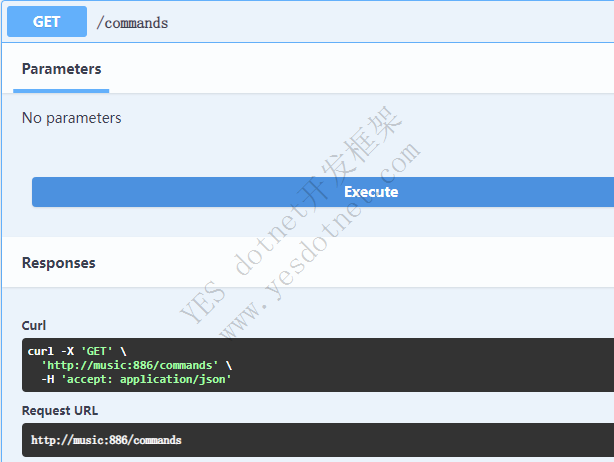
返回的结果如下:
[
  "command: add",
  "command: addid",
  "command: addtagid",
  "command: albumart",
  "command: binarylimit",
  "command: channels",
  "command: clear",
  "command: clearerror",
  "command: cleartagid",
  "command: close",
  "command: commands",
  "command: config",
  "command: consume",
  "command: count",
  "command: crossfade",
  "command: currentsong",
  "command: decoders",
  "command: delete",
  "command: deleteid",
  "command: delpartition",
  "command: disableoutput",
  "command: enableoutput",
  "command: find",
  "command: findadd",
  "command: getfingerprint",
  "command: idle",
  "command: kill",
  "command: list",
  "command: listall",
  "command: listallinfo",
  "command: listfiles",
  "command: listmounts",
  "command: listpartitions",
  "command: listplaylist",
  "command: listplaylistinfo",
  "command: listplaylists",
  "command: load",
  "command: lsinfo",
  "command: mixrampdb",
  "command: mixrampdelay",
  "command: mount",
  "command: move",
  "command: moveid",
  "command: moveoutput",
  "command: newpartition",
  "command: next",
  "command: notcommands",
  "command: outputs",
  "command: outputset",
  "command: partition",
  "command: password",
  "command: pause",
  "command: ping",
  "command: play",
  "command: playid",
  "command: playlist",
  "command: playlistadd",
  "command: playlistclear",
  "command: playlistdelete",
  "command: playlistfind",
  "command: playlistid",
  "command: playlistinfo",
  "command: playlistmove",
  "command: playlistsearch",
  "command: plchanges",
  "command: plchangesposid",
  "command: previous",
  "command: prio",
  "command: prioid",
  "command: random",
  "command: rangeid",
  "command: readcomments",
  "command: readmessages",
  "command: readpicture",
  "command: rename",
  "command: repeat",
  "command: replay_gain_mode",
  "command: replay_gain_status",
  "command: rescan",
  "command: rm",
  "command: save",
  "command: search",
  "command: searchadd",
  "command: searchaddpl",
  "command: seek",
  "command: seekcur",
  "command: seekid",
  "command: sendmessage",
  "command: setvol",
  "command: shuffle",
  "command: single",
  "command: stats",
  "command: status",
  "command: sticker",
  "command: stop",
  "command: subscribe",
  "command: swap",
  "command: swapid",
  "command: tagtypes",
  "command: toggleoutput",
  "command: unmount",
  "command: unsubscribe",
  "command: update",
  "command: urlhandlers",
  "command: volume"
]
再测一下 listall 命令。
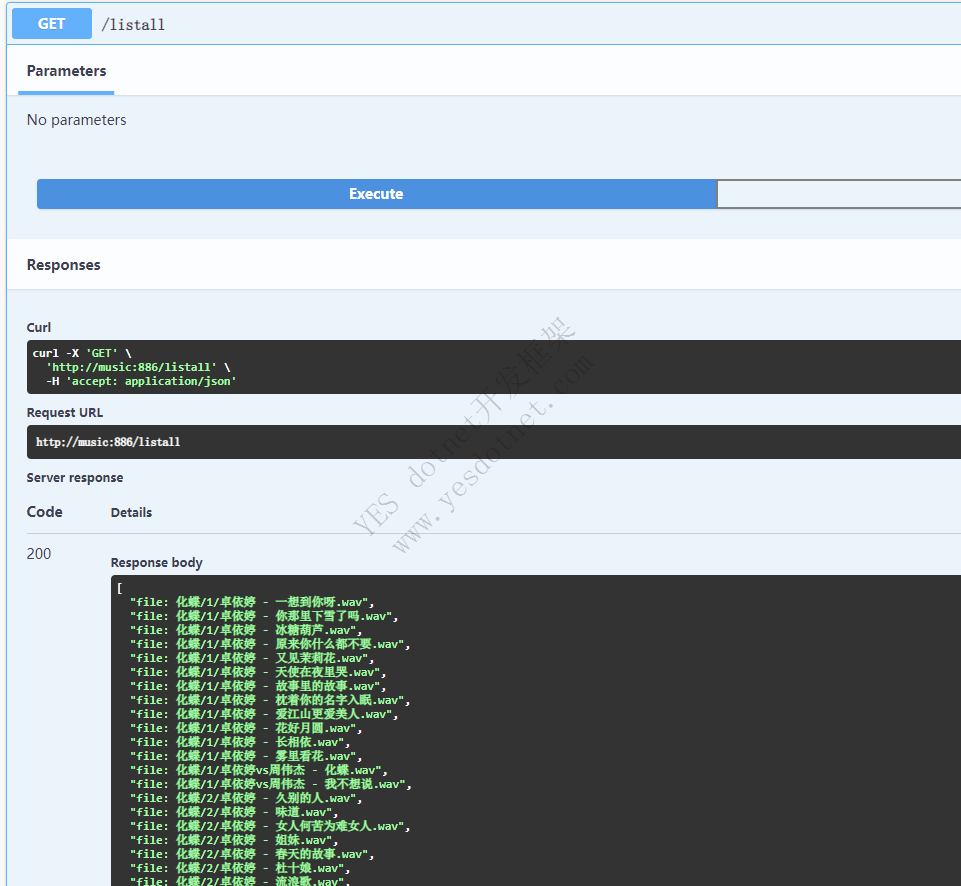
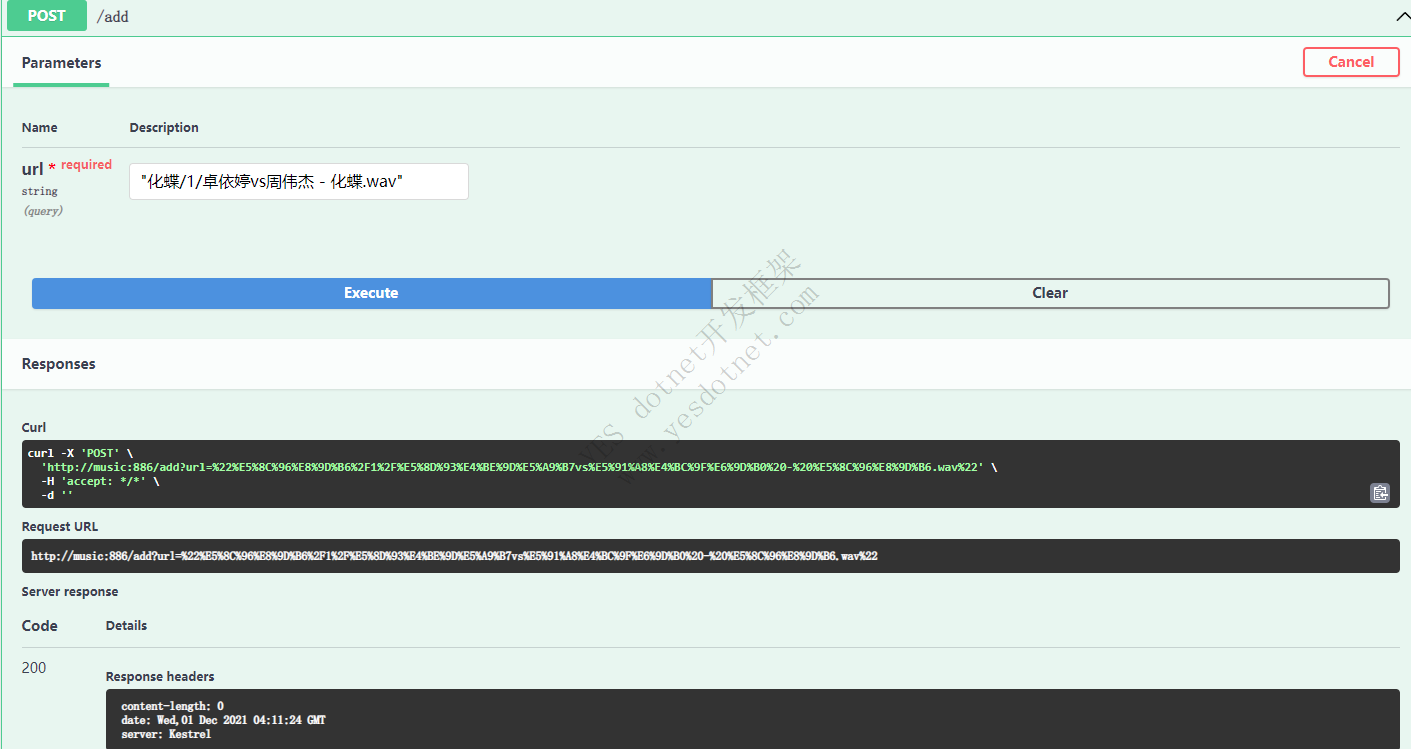
向当前播放列表中添加一首曲子,注意:MPD 服务返回的文件名是有“file: ”开头的,而咱们传递给 add 命令时,不需要"file:",直接用相对路径即可(建议加上双引号)。
再测试一下 playlist 接口,列出当前播放列表中的曲目。

返回的播放列表如下:
[
  "0:file: 化蝶/1/卓依婷vs周伟杰 - 化蝶.wav",
  "1:file: 我的中国心/张明敏 - 龙的传人.wav",
  "2:file: 化蝶/1/卓依婷 - 花好月圆.wav"
]
“file:”前面的数字是曲目在播放列表中的位置,从 0 开始计算,这样一来,在使用 play 命令时就可以通过这个数字来指定要播放的曲目,比如要播放第二首(位置1)。
不过,刚才老周写的 play API是没有参数的,默认播放整个列表,咱们可以改一下。
app.MapGet("/play", async (int? pos, MPDTCPClient cl) =>
{
    bool res = await cl.Play(pos ?? -1);
    return res ? Results.Ok() : Results.StatusCode(500);
});
如果 pos 参数为 -1,表示从头播放整个列表。
现在,可以调用了,播放第二首曲子。
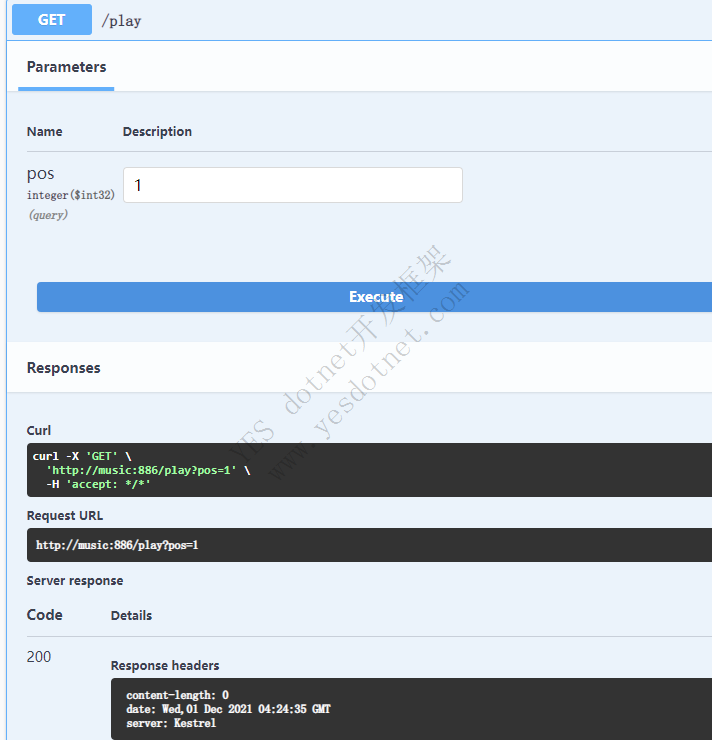
好了,今天的文章就水到这里了。预告一下,下一篇水文中,咱们玩玩 LED 彩色灯带。