C# 设置或验证 PDF中的文本域格式
概述
PDF中的文本域可以通过设置不同格式,用于显示数字、货币、日期、时间、邮政编码、电话号码和社保号等等。Adobe Acrobat提供了许多固定的JavaScripts用来设置和验证文本域的格式,如:AFNumber_Format(2, 0, 0, 0, "$", true)和AFNumber_Keystroke(2, 0, 0, 0, "$", true)。Format后缀的script是用来设置文本域显示的格式,而Keystroke后缀的script是用来验证输入内容。
Spire.PDF for .NET提供了相应的方法来设置和验证文本域格式。下面的表格罗列了常用的格式和Spire.PDF中对应的方法,可参考使用:
描述 | 示例 | JavaScript | Spire.PDF提供的方法 |
日期 | 01/05/2022 | AFDate_FormatEx("mm/dd/yyyy"); AFDate_KeystrokeEx("mm/dd/yyyy"); | GetDateFormatString("mm/dd/yyyy"); GetDateKeystrokeString("mm/dd/yyyy"); |
邮政编码 | 12345 | AFSpecial_Format(0); AFSpecial_Keystroke(0); | GetSpecialFormatString(0); GetSpecialKeystrokeString(0); |
邮政编码+4 | 12345-1234 | AFSpecial_Format(1); AFSpecial_Keystroke(1); | GetSpecialFormatString(1); GetSpecialKeystrokeString(1); |
电话号码 | (123)456-7890 | AFSpecial_Format(2); AFSpecial_Keystroke(2); | GetSpecialFormatString(2); GetSpecialKeystrokeString(2); |
货币 | $12345.00 -$12345.00 | AFNumber_Format(2,0,0,0,"$",true); AFNumber_Keystroke(2,0,0,0,"$",true); | GetNumberFormatString(2,0,0,0,"$",true); GetNumberKeystrokeString(2,0,0,0,"$",true); |
验证 | 1.5≤输入值≤5.5 | AFRange_Validate(true,1.5,true,5.5); | GetRangeValidateString(true,1.5,true,5.5); |
引入dll
1.通过 NuGet 安装dll(2种方法)
1.1 可以在Visual Studio中打开“解决方案资源管理器”,鼠标右键点击“引用”,“管理NuGet包”,然后搜索“Spire.PDF”,点击“安装”。
1.2 将以下内容复制到PM控制台安装。
Install-Package Spire.PDF -Version 7.12.1
2.手动添加dll引用
可通过手动 下载包,然后解压,找到BIN文件夹下的Spire.Pdf.dll。在Visual Studio中打开“解决方案资源管理器”,鼠标右键点击“引用”,“添加引用”将本地路径BIN文件夹下的dll文件添加引用至程序。
代码(C#/VB.NET)
C#
using Spire.Pdf;
using Spire.Pdf.Actions;
using Spire.Pdf.Fields;
using System.Drawing;

namespace SetTextFormatInTextboxField
{
    class Program
    {
        static void Main(string[] args)
        {
            //新建PDF文档,并添加空白页
            PdfDocument pdf = new PdfDocument();
            PdfPageBase page = pdf.Pages.Add();

            //定义坐标变量
            float X = 10;
            float Y = 10;
            float width = 100;
            float height = 20;

            //实例化一个文本域对象,并设置它的位置和边框样式
            PdfTextBoxField textbox = new PdfTextBoxField(page, "Number-TextBox");
            textbox.Bounds = new RectangleF(X, Y, width, height);
            textbox.BorderWidth = 0.75f;
            textbox.BorderStyle = PdfBorderStyle.Solid;

            //给文本域的键盘击键事件设置一个JavaScript动作用于验证输入内容是否符合要求
            string js = PdfJavaScript.GetNumberKeystrokeString(2, 0, 0, 0, "$", true);
            PdfJavaScriptAction jsAction = new PdfJavaScriptAction(js);
            textbox.Actions.KeyPressed = jsAction;

            //设置文本域内容显示为数字货币
            js = PdfJavaScript.GetNumberFormatString(2, 0, 0, 0, "$", true);
            jsAction = new PdfJavaScriptAction(js);
            textbox.Actions.Format = jsAction;

            //添加文本域到PDF中,并保存文档
            pdf.Form.Fields.Add(textbox);


            //添加文本框,设置文本内容显示为日期格式
            PdfTextBoxField textbox1 = new PdfTextBoxField(page, "DateFormat-TextBox");
            textbox1.Bounds = new RectangleF(X+200, Y, width, height);
            textbox1.BorderWidth = 0.75f;
            textbox1.BorderStyle = PdfBorderStyle.Solid;
            string js1 = PdfJavaScript.GetDateKeystrokeString("mm/dd/yyyy");
            PdfJavaScriptAction jsAction1 = new PdfJavaScriptAction(js1);
            textbox1.Actions.KeyPressed = jsAction1;
            js1 = PdfJavaScript.GetDateFormatString("mm/dd/yyyy");
            jsAction1 = new PdfJavaScriptAction(js1);
            textbox1.Actions.Format = jsAction1;
            pdf.Form.Fields.Add(textbox1);


            //添加文本框,设置文本内容显示为邮政编码格式
            PdfTextBoxField textbox2 = new PdfTextBoxField(page, "SpecialFormat0-1-TextBox");
            textbox2.Bounds = new RectangleF(X + 400, Y, width, height);
            textbox2.BorderWidth = 0.75f;
            textbox2.BorderStyle = PdfBorderStyle.Solid;
            //string js2 = PdfJavaScript.GetSpecialKeystrokeString(0);
            string js2 = PdfJavaScript.GetSpecialKeystrokeString(1);

            PdfJavaScriptAction jsAction2 = new PdfJavaScriptAction(js2);
            textbox2.Actions.KeyPressed = jsAction2;
            //js2 = PdfJavaScript.GetSpecialFormatString(0);
            js2 = PdfJavaScript.GetSpecialFormatString(1);
            jsAction2 = new PdfJavaScriptAction(js2);
            textbox2.Actions.Format = jsAction2;
            pdf.Form.Fields.Add(textbox2);


            //添加文本框,设置文本内容显示为百分数
            PdfTextBoxField textbox3 = new PdfTextBoxField(page, "SpecialFormat2-TextBox");
            textbox3.Bounds = new RectangleF(X, Y+50, width, height);
            textbox3.BorderWidth = 0.75f;
            textbox3.BorderStyle = PdfBorderStyle.Solid;
            string js3 = PdfJavaScript.GetPercentKeystrokeString(1,0);
            PdfJavaScriptAction jsAction3 = new PdfJavaScriptAction(js3);
            textbox3.Actions.KeyPressed = jsAction3;
            js3 = PdfJavaScript.GetPercentFormatString(1, 0);
            jsAction3 = new PdfJavaScriptAction(js3);
            textbox3.Actions.Format = jsAction3;
            pdf.Form.Fields.Add(textbox3);

            //添加文本框,设置数据验证
            PdfTextBoxField textbox4 = new PdfTextBoxField(page, "RangeValidate-TextBox");
            textbox4.Bounds = new RectangleF(X+200, Y + 50, width, height);
            textbox4.BorderWidth = 0.75f;
            textbox4.BorderStyle = PdfBorderStyle.Solid;
            string js4 = PdfJavaScript.GetRangeValidateString(true, -18, true, 18);
            PdfJavaScriptAction jsAction4 = new PdfJavaScriptAction(js4);
            textbox4.Actions.Format = jsAction4;
            pdf.Form.Fields.Add(textbox4);

            //保存文档
            pdf.SaveToFile("FormatField.pdf", FileFormat.PDF);
        }
    }
}
VB.NET
Imports Spire.Pdf
Imports Spire.Pdf.Actions
Imports Spire.Pdf.Fields
Imports System.Drawing

Namespace SetTextFormatInTextboxField
    Class Program
        Private Shared Sub Main(args As String())
            '新建PDF文档,并添加空白页
            Dim pdf As New PdfDocument()
            Dim page As PdfPageBase = pdf.Pages.Add()

            '定义坐标变量
            Dim X As Single = 10
            Dim Y As Single = 10
            Dim width As Single = 100
            Dim height As Single = 20

            '实例化一个文本域对象,并设置它的位置和边框样式
            Dim textbox As New PdfTextBoxField(page, "Number-TextBox")
            textbox.Bounds = New RectangleF(X, Y, width, height)
            textbox.BorderWidth = 0.75F
            textbox.BorderStyle = PdfBorderStyle.Solid

            '给文本域的键盘击键事件设置一个JavaScript动作用于验证输入内容是否符合要求
            Dim js As String = PdfJavaScript.GetNumberKeystrokeString(2, 0, 0, 0, "$", True)
            Dim jsAction As New PdfJavaScriptAction(js)
            textbox.Actions.KeyPressed = jsAction

            '设置文本域内容显示为数字货币
            js = PdfJavaScript.GetNumberFormatString(2, 0, 0, 0, "$", True)
            jsAction = New PdfJavaScriptAction(js)
            textbox.Actions.Format = jsAction

            '添加文本域到PDF中,并保存文档
            pdf.Form.Fields.Add(textbox)


            '添加文本框,设置文本内容显示为日期格式
            Dim textbox1 As New PdfTextBoxField(page, "DateFormat-TextBox")
            textbox1.Bounds = New RectangleF(X + 200, Y, width, height)
            textbox1.BorderWidth = 0.75F
            textbox1.BorderStyle = PdfBorderStyle.Solid
            Dim js1 As String = PdfJavaScript.GetDateKeystrokeString("mm/dd/yyyy")
            Dim jsAction1 As New PdfJavaScriptAction(js1)
            textbox1.Actions.KeyPressed = jsAction1
            js1 = PdfJavaScript.GetDateFormatString("mm/dd/yyyy")
            jsAction1 = New PdfJavaScriptAction(js1)
            textbox1.Actions.Format = jsAction1
            pdf.Form.Fields.Add(textbox1)


            '添加文本框,设置文本内容显示为邮政编码格式
            Dim textbox2 As New PdfTextBoxField(page, "SpecialFormat0-1-TextBox")
            textbox2.Bounds = New RectangleF(X + 400, Y, width, height)
            textbox2.BorderWidth = 0.75F
            textbox2.BorderStyle = PdfBorderStyle.Solid
            'string js2 = PdfJavaScript.GetSpecialKeystrokeString(0);
            Dim js2 As String = PdfJavaScript.GetSpecialKeystrokeString(1)

            Dim jsAction2 As New PdfJavaScriptAction(js2)
            textbox2.Actions.KeyPressed = jsAction2
            'js2 = PdfJavaScript.GetSpecialFormatString(0);
            js2 = PdfJavaScript.GetSpecialFormatString(1)
            jsAction2 = New PdfJavaScriptAction(js2)
            textbox2.Actions.Format = jsAction2
            pdf.Form.Fields.Add(textbox2)


            '添加文本框,设置文本内容显示为百分数
            Dim textbox3 As New PdfTextBoxField(page, "SpecialFormat2-TextBox")
            textbox3.Bounds = New RectangleF(X, Y + 50, width, height)
            textbox3.BorderWidth = 0.75F
            textbox3.BorderStyle = PdfBorderStyle.Solid
            Dim js3 As String = PdfJavaScript.GetPercentKeystrokeString(1, 0)
            Dim jsAction3 As New PdfJavaScriptAction(js3)
            textbox3.Actions.KeyPressed = jsAction3
            js3 = PdfJavaScript.GetPercentFormatString(1, 0)
            jsAction3 = New PdfJavaScriptAction(js3)
            textbox3.Actions.Format = jsAction3
            pdf.Form.Fields.Add(textbox3)

            '添加文本框,设置数据验证
            Dim textbox4 As New PdfTextBoxField(page, "RangeValidate-TextBox")
            textbox4.Bounds = New RectangleF(X + 200, Y + 50, width, height)
            textbox4.BorderWidth = 0.75F
            textbox4.BorderStyle = PdfBorderStyle.Solid
            Dim js4 As String = PdfJavaScript.GetRangeValidateString(True, -18, True, 18)
            Dim jsAction4 As New PdfJavaScriptAction(js4)
            textbox4.Actions.Format = jsAction4
            pdf.Form.Fields.Add(textbox4)

            '保存文档
            pdf.SaveToFile("FormatField.pdf", FileFormat.PDF)
        End Sub
    End Class
End Namespace
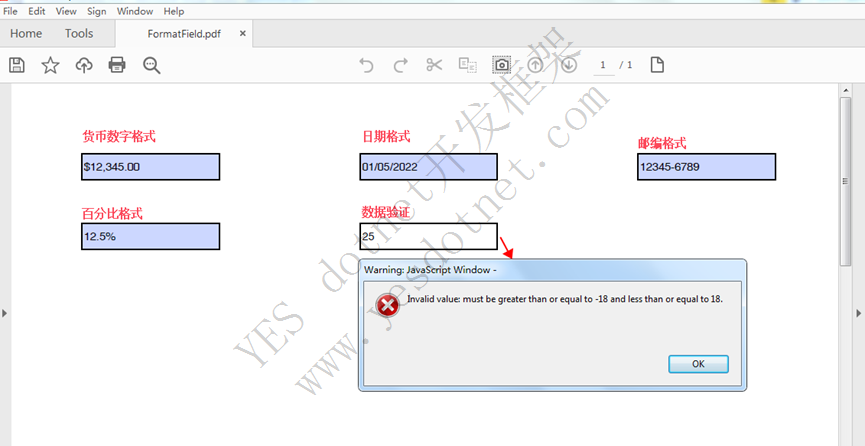
设置后的文本框域填写效果如图:
—End—