Epicor上传文件目录的获取,服务器文件路径获取
方法一
前端用了file-transfer-erp来上传附件到服务器
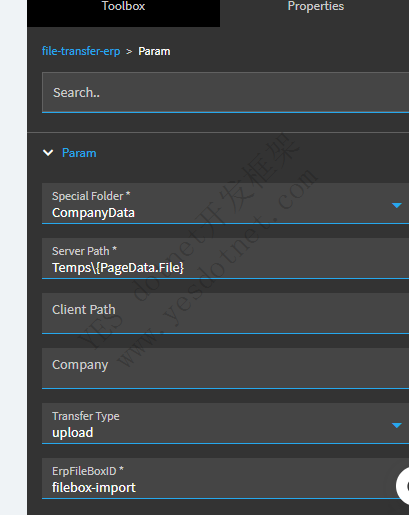
再代码中获取这个文件对应的文件路径
C# 全选
Ice.Hosting.ServerDataPath serverDataPath = new Ice.Hosting.ServerDataPath(base.Session);
string fullPath = serverDataPath.ResolvePath(Epicor.ServiceModel.Utilities.SpecialFolder.CompanyData, this.fileName);
this.message = fullPath;测试结果:
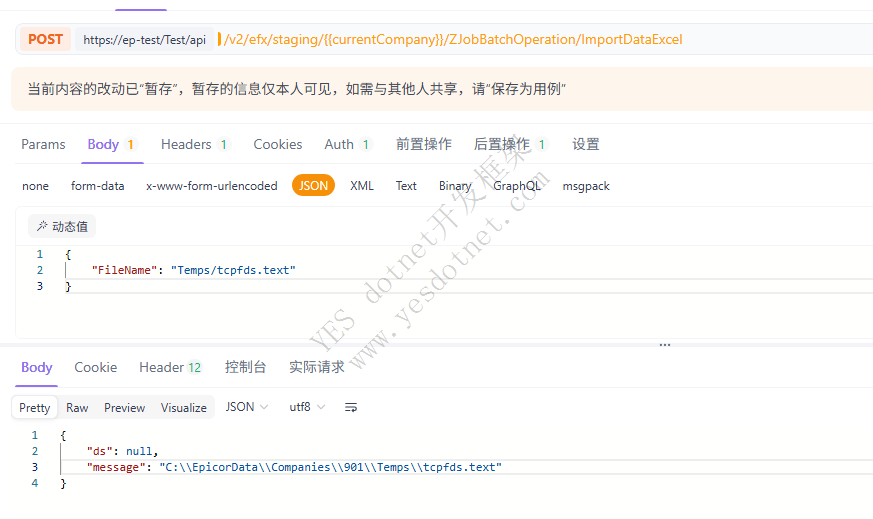
函数中文件读取:
在函数中直接使用File.Read会告警,(代码检查没问题,保存函数库时会弹出警告)
C# 全选
var fileStream = System.IO.File.OpenRead(this.excelFile);GetExcelData.cs(66,30): warning ECF1002: The 'System.IO.File.OpenRead(string)' method cannot be called.
换一种方式读取StreamReader,依然不行,也一样报警:
C# 全选
StreamReader reader = new StreamReader(this.excelFile);
string text = reader.ReadToEnd(); // 读内容
byte[] bytes = Encoding.UTF8.GetBytes(text);
Stream fileStream = new MemoryStream(bytes);GetExcelData.cs(67,35): warning ECF1002: The 'System.IO.StreamReader.StreamReader(string)' constructor cannot be called.
在函数Function中是不允许使用System.IO.File.Read的,因此,方法一获得的文件绝对路径不适用在函数中读取文件
正确的读取方法:
Markup 全选
var _test_filePath = new FilePath(Ice.Customization.Sandbox.ServerFolder.CompanyData,this.excelFile);
if(this.Sandbox.IO.File.Exists(_test_filePath)) {
  this.message ="文件存在";
} else {
  this.message ="文件不存在";
}
版权声明:本文为YES开发框架网发布内容,转载请附上原文出处连接
epicor 张国生



